
Fadé Adeniyi
Friday 30 October 2026
Ten things you can build with Claude without being a developer. For each one you get where to build it, the steps and the exact prompt to copy.
No. You need to describe exactly what you want. Claude can build web pages, small tools and spreadsheets in a chat, run a task for you on a schedule and write code into a folder on your computer. Each build below says where to make it, the steps and the prompt to copy.
At Reply I was the Lead Technical PM on QuickConnect, an integration layer built on Azure. We shipped the MVP in four months with a team across several time zones. Most of that job was describing exactly what we needed and checking we got it. That's the skill you need here.
Where each build happens. Claude has three places to make things and the plan you're on decides which you can use.
How every build works. Paste the prompt, fill in anything in [BRACKETS] and answer Claude's questions. Then tell it what to change, one thing at a time. "Make the monster slower" works better than ten fixes in one message.
The trap is typing "make me a budget app" and nothing else. Claude fills every gap with a guess, so you get something generic and decide AI can't do it. Give it your real details, like the prompts below ask for.
The 10 builds
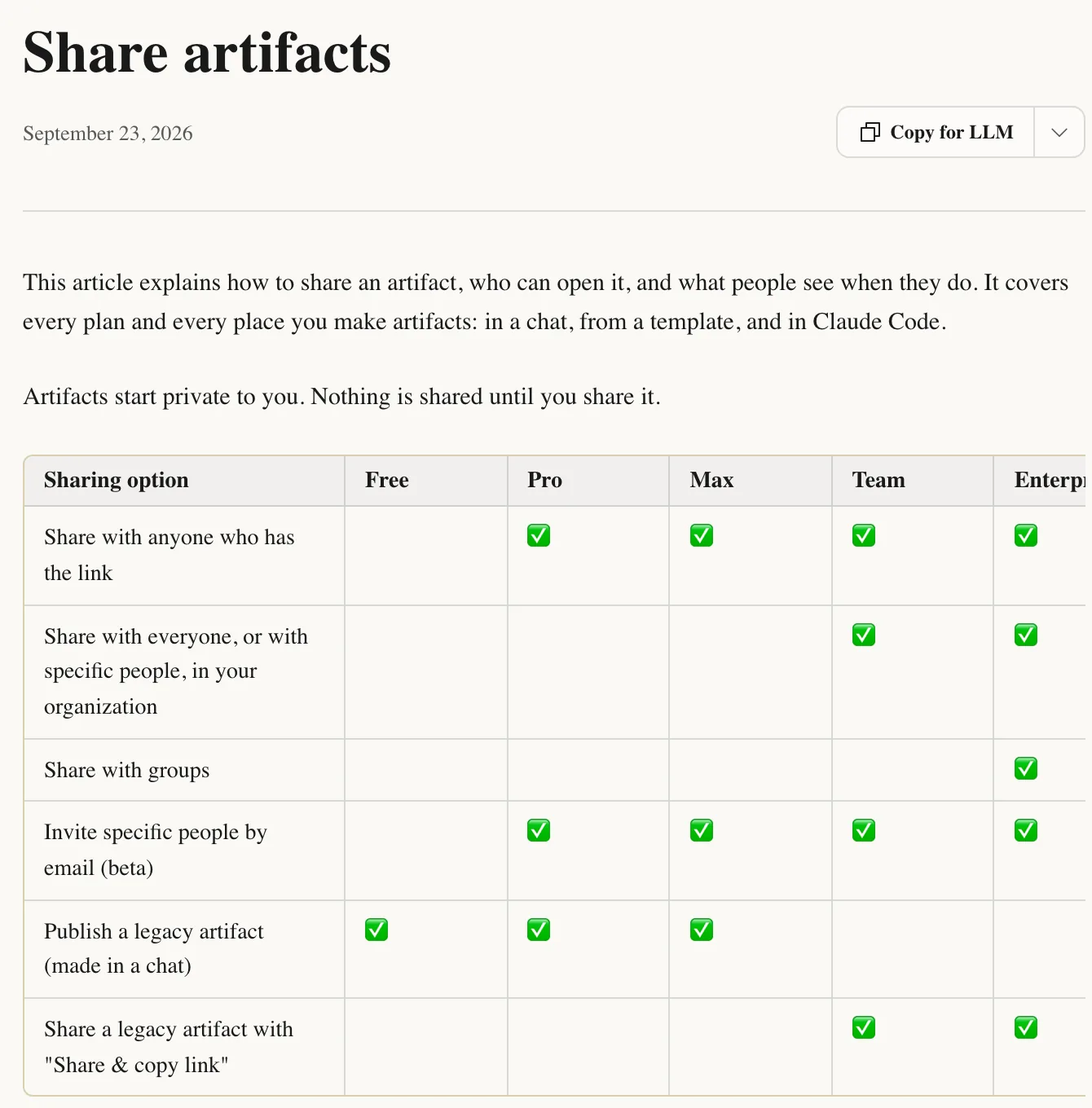
1. Your own website. Paste this into a chat and Claude shows the page next to it. To share it, click Share. On Pro and up you can share it with anyone who has the link and on Free you can publish one made in a chat (how sharing works). Want your own web address? Ask for the HTML file, put it in a folder and drag the folder onto Netlify Drop.
Build me a one-page website as a single HTML file. I'm [YOUR NAME] and I [WHAT YOU DO] for [WHO IT'S FOR]. Sections: a headline that says what I do, my [NUMBER] services with [PRICES OR "NO PRICES"], a short about me, [REAL TESTIMONIALS OR "NO TESTIMONIALS"] and a contact button that emails [YOUR EMAIL]. Style: [THREE WORDS, E.G. CALM, BOLD, WARM]. Colours: [YOUR COLOURS]. Design it for a phone first. Don't invent anything about me. Ask me what you need before you start.
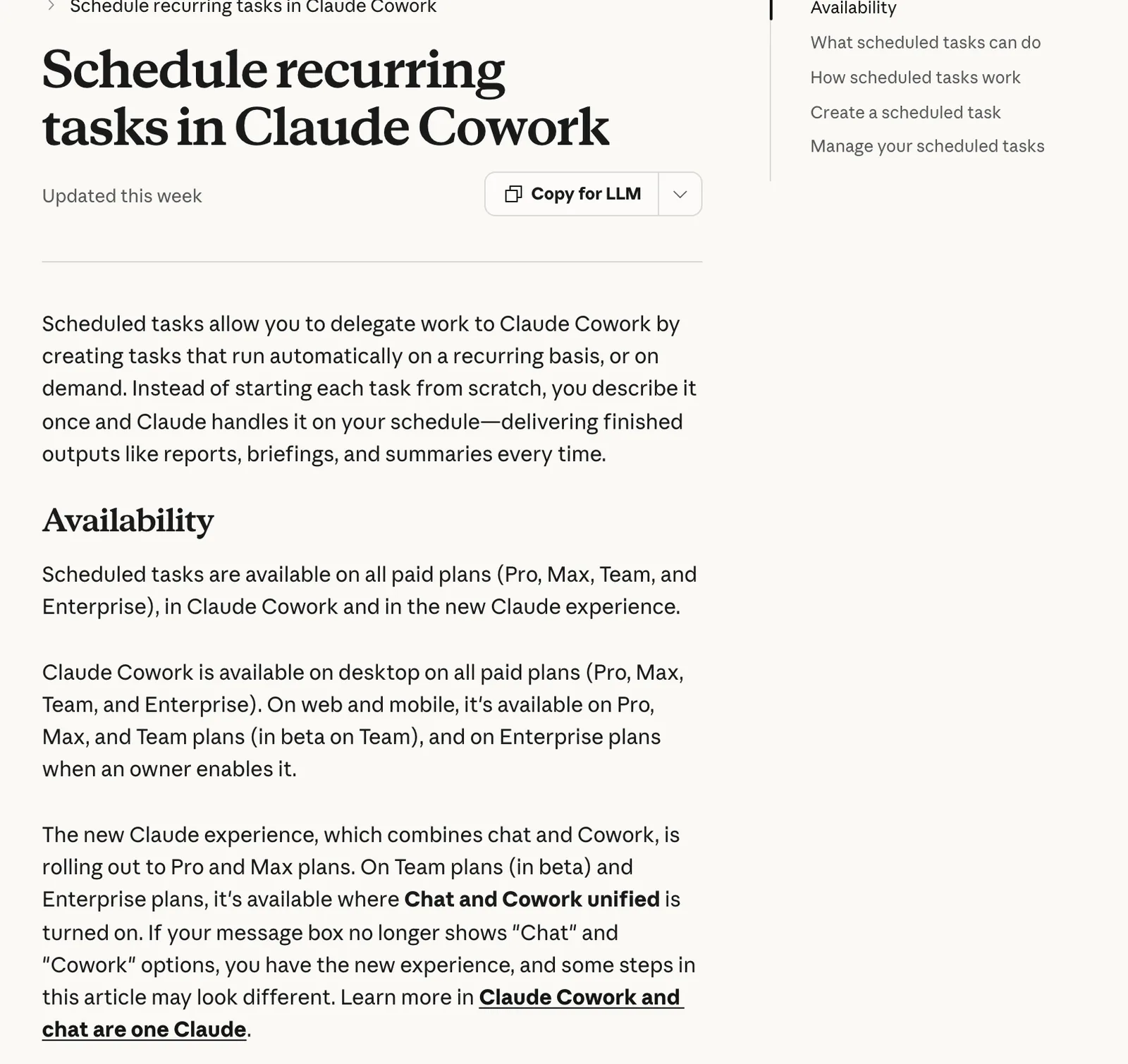
2. A morning brief. Connect Gmail and Google Calendar under Customize, then Connectors (Google connectors). In Cowork, click Scheduled, then New task, then Create with Claude and paste this. It runs even when your laptop's asleep. On Free, save the prompt and run it in a chat each morning.
Every weekday at 7am, read my Gmail and Google Calendar and write my morning brief.
1. TODAY: each meeting with the time, who's in it and anything I need to prepare.
2. NEEDS ME: emails from the last 24 hours that need a reply or a decision from me, one line each, most urgent first.
3. CAN WAIT: anything else worth knowing, three lines at most. Skip newsletters, receipts and notifications. Read only: never send, reply to, archive or delete anything.
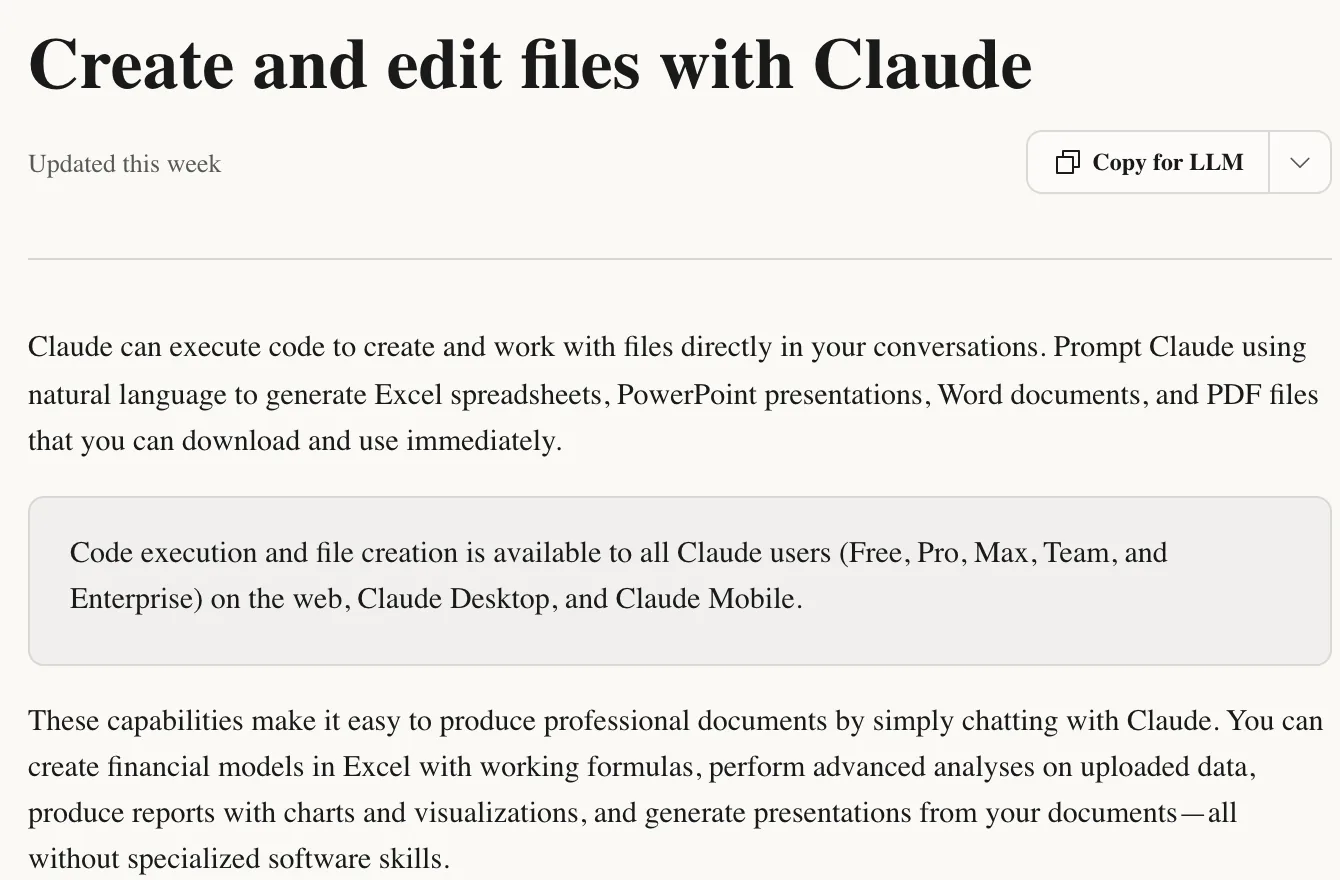
3. A budget tracker. Make sure file creation is on, then paste this into a chat. You can also attach a bank export as a CSV and ask Claude to sort last month in. It creates Excel files with working formulas that open in Excel or Google Sheets.
Build me a budget tracker as an Excel file with real formulas, not typed totals. My monthly income is about [AMOUNT]. My regular costs are [RENT, BILLS, SUBSCRIPTIONS WITH AMOUNTS]. I mostly spend on [YOUR CATEGORIES].
TAB 1 TRANSACTIONS: date, description, category dropdown, amount.
TAB 2 MONTHLY SUMMARY: spend per category against a budget I can edit and what's left.
TAB 3 CHART: spending by category this month. Add five example rows I can delete. Everything should update when I add a row.
Check one total by hand before you trust the summary tab.
4. A booking page. Let Google handle the slots. In Google Calendar, click Create, then Appointment schedule. Set your hours, switch on confirmation emails and copy the booking link. Then ask Claude for the page around it and share it like build 1.
Build me a booking page as a single HTML file for my [BUSINESS OR SERVICE]. List my session types with length, price and who each is for: [DETAILS]. Every Book button opens [YOUR GOOGLE BOOKING PAGE LINK] in a new tab. Add a short "what happens next" section and answers to [THE 3 QUESTIONS CLIENTS ALWAYS ASK]. Colours: [YOUR COLOURS]. Phone first.
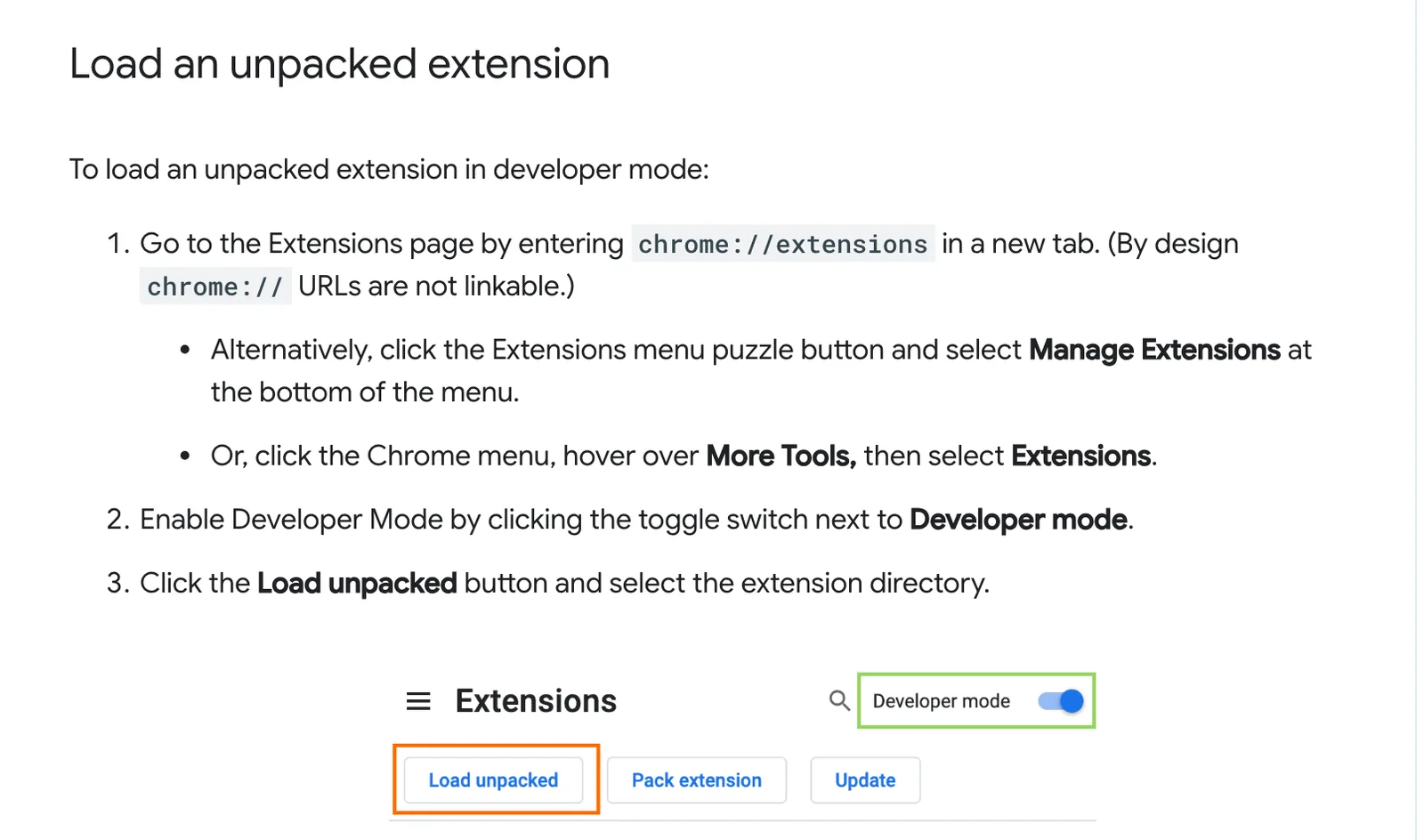
5. A Chrome extension. This one needs Claude Code. Make an empty folder, open the Code tab in Claude Desktop, choose the folder and paste this. Then type chrome://extensions into Chrome, switch on Developer mode, click Load unpacked and pick the folder (Chrome docs). After a change, click the extension's refresh icon.
Build me a Chrome extension (Manifest V3) in this folder. When I click its toolbar button it should [THE ONE ANNOYING THING, E.G. COPY THE PAGE TITLE AND LINK AS ONE LINE I CAN PASTE INTO MY NOTES]. Use the fewest files and permissions possible and tell me in plain words what each permission allows. Don't send any data off my computer. When it's done, give me the exact steps to load it in Chrome.
Only keep permissions Claude can explain. If a one-button job wants to read every site you visit, ask why.
6. An invoice generator. Paste this into a chat, fill in a client and the amount, then press Download PDF and choose Save as PDF in the print window. For a one-off, give Claude the client and the amount and ask for a PDF invoice.
Build me an invoice generator as an interactive tool. Fields: client name and address, invoice number, date, due date, line items (description, quantity, rate) with add and remove buttons, VAT on or off at [RATE]% and my payment details [BANK DETAILS OR PAYMENT LINK]. Total everything automatically. Show a clean preview with [YOUR BUSINESS NAME] and space for my logo at the top. British dates, [CURRENCY]. Add a Download PDF button that uses the browser's print to PDF.
7. A Slack bot for your team. On a Claude Team or Enterprise plan, ask a workspace Owner to set up Claude Tag so your team can tag @Claude in a channel. Otherwise, paste this into the Code tab in a new folder. It runs on your computer through Slack's Socket Mode and needs permission to add apps to your Slack plus a Claude API key, billed separately. It's the hardest build here.
Build me a Slack bot in this folder that answers my team's repeat questions. It answers only from a file called faq.md. Start it with these: [PASTE YOUR TOP 10 QUESTIONS AND ANSWERS]. When someone mentions the bot in a channel, it replies in the thread. If the answer isn't in faq.md, it says it doesn't know and tags me. Use the Claude API with my key to match questions to the FAQ. Use Slack's Socket Mode so it runs on my computer with no server. Walk me through creating the app at api.slack.com/apps one click at a time, tell me which tokens to copy and keep every key in a .env file.
8. A habit tracker. Saving your ticks uses artifact storage, which needs Pro, Max, Team or Enterprise. On Free, ask for an Excel version instead.
Build me a habit tracker as an interactive artifact that saves my data between visits in personal storage, so only I see it. My habits and when I do them: [E.G. WALK AFTER THE SCHOOL RUN, READ 10 PAGES AT 9PM, NO PHONE AT DINNER]. Show today's habits as big tick boxes, a streak for each, a weekly grid and one short line of encouragement on days I tick them all. Let me add, rename and pause habits. Phone first.
9. A content calendar. Posting with a team? Ask for an Excel version with a status dropdown and upload it to Google Sheets.
Build me a content calendar as an interactive artifact that saves between visits. I post on [PLATFORMS], [NUMBER] times a week, about [YOUR TOPICS]. Give me a month view where each day shows the post title, platform and status (idea, scripted, filmed, posted), an ideas list I can move onto a date and a filter by platform. Fill next month with [NUMBER] ideas from my topics, all marked as ideas.
10. A mini game for your kids. Write down their rules in their words first. To let them play away from your account, share it like build 1.
Build a simple game my kids can play in the browser, as an interactive artifact. The rules they made up: [THEIR RULES, IN THEIR WORDS]. They're [AGES]. Big buttons, bright colours, works with touch on a tablet, a score, a restart button and sound I can mute. No links out, no ads, no chat and nothing that collects data. After they've played it once, ask me what they'd change.
You've got ten prompts and the steps for each. Pick the one thing that annoys you most this week, paste its prompt and change one thing at a time until you'd use it.
How I use it. My morning brief was the first thing on this list I built for myself. My Executive Assistant reads my inboxes and calendar every morning and posts one summary to Slack before I've had my coffee, then messages me during the day when an email needs a reply from me. I rebuilt my link-in-bio page with Claude in one evening too. If you're starting from zero, start with the morning brief, because it gives you time back on the first day.
What this won't do: Claude makes mistakes, so check totals, dates and anything a client sees. Cowork, Claude Code and saved data need a paid plan. An artifact that uses your connected apps can't be shared with anyone who has the link. The Slack bot only runs while your computer is on and its API use costs extra. Keep client and money details out of anything you share.
You don't need to code. You need to know what to ask for.
Related guides: 5 things I'd build in Claude if I had a free weekend, Building your own AI daily brief and Build your own booking system.
Sources, opened 30 October 2026: Claude Help Center, What are artifacts, Share artifacts, Create and edit files, Scheduled tasks in Cowork, Google Workspace connectors, Claude Tag and API billing; Claude Code Docs, desktop quickstart; Chrome for Developers, Hello World extension; Slack, Socket Mode; Google Calendar Help, appointment schedules; Netlify Docs, Netlify Drop.
The Audacity to Build is my community for people doing exactly that. It is opening soon. Join the waitlist and you are first in when it does.
If this was useful, follow me. I share what I am actually building, the tools that survive my own testing, and the ones I quietly cancel. New plays every week.
Pop in your name and email and the guide is yours, along with the occasional new guide when I publish one. No spam, ever.