
Fadé Adeniyi
Friday 30 October 2026
The audit prompt I ran on my own website, how to let Claude Code subagents work through the fixes and the re-audit that shows you what actually changed.
Your site can look fine to you and still be hard for search to read. Run one audit with Claude, get the plan before anything changes, let subagents make the fixes and audit again to see what moved. This guide gives you the prompt for every step.
I've spent sixteen years building products and I still found 20 issues when I audited my own site in October. Most of them were invisible from the front end. A slow homepage, the same page living at more than one address, no dates on my guides and my name spelt three different ways.
SEO is how you show up in Google's results. AEO, answer engine optimisation, is how you show up when someone asks ChatGPT, Perplexity, Claude or Gemini a question instead of searching. They share most of the same plumbing. A crawler has to be able to reach the page, store one clean copy of it, understand what it's about and who wrote it, then trust it enough to show or quote it. A page that fails an early step never reaches the later ones.
The 4 prompts
1. Open Claude Code on the right folder. Point it at the project your website actually deploys from, not an old copy. If your site lives on a builder with no code folder, give Claude the live address instead and it can still read every page.
2. Paste my audit prompt. This is the exact one I used. Swap the two bracketed bits for your folder and your web address.
You are a marketing, CRO, SEO, and AEO growth expert. Do a full SEO and AEO audit of my website ([PROJECT_FOLDER], which deploys to [LIVE_URL]; make sure you open the correct project in Claude Code, Codex, or Cursor).

I want a comprehensive report and plan of what's broken from an SEO and AEO perspective, HOW I should fix each issue (including prompts I can give Claude to implement the fix), and best practices I should follow when I create new blog pages, guide pages, and landing pages so I can bake them into my existing skills/workflows.

Do not implement changes yet. Plan and report only.

Deliver it as a visual HTML file. Cover text, positioning, design, and technical changes. Teach the principles so I can learn and apply them going forward, not just check boxes.
Keep the line "Do not implement changes yet." It stops Claude changing anything before you've read the plan. What comes back is a report you can read like a brief, with the reason behind each fix and a ready-made prompt for each one.
3. Read the report before you do anything else. Look for the decisions only you can make, like which name or topic you want to be known for. Claude can't guess those for you.
Asking Claude to "fix my SEO" and letting it change things as it goes. It feels like progress, but you never see why anything was broken, so the same mistakes come back on the next page you publish.
1. Split the fix list. A subagent in Claude Code runs in its own context window, so several can each take one group of fixes without stepping on each other. You don't need to set anything up first because you can ask for them in plain English.
Read the audit report you made: [REPORT FILE].

Group the fixes so no two groups touch the same files. For example: redirects and canonical tags, structured data, sitemap and llms.txt, link previews, page speed.

Give each group to its own subagent. Each one fixes only its group and tells me every file it changed and how I can check the fix myself.

Don't deploy anything. When they're all done, give me one list: what changed, what still needs me and anything that went wrong.
2. While they work, check your link previews. The title, description and image you see when you paste a link into WhatsApp or LinkedIn come from Open Graph tags, mainly og:title, og:description, og:image and og:url. They're what people see before deciding whether to click.
For each of these pages, show me exactly what a link preview will use: the og:title, og:description, og:image and og:url tags.

[PASTE 3 TO 5 OF YOUR PAGE ADDRESSES]

Flag any page where one of them is missing, where the image is the same as on every other page or where the description gets cut off.
Then test it for real. Paste one of your links into a chat with yourself and look at what shows up.
I ran this exact prompt on fadeadeniyi.com on 29 October. Claude found 20 issues and gave me the plan before it touched a thing. I made the calls only I could make, like how my name is spelt and whether AI bots can read my pages, then subagents worked through the list. The same night I had it measure everything again. My homepage speed score went from 58 to 85 and the page went from 2,055 KB to 378 KB. I'm running it again every month.
1. Run the same audit again. Use the same prompt, the same pages and the same tool, otherwise the before and after can't be compared.
Run the same SEO and AEO audit again on [LIVE_URL].

Open the first report ([FIRST REPORT FILE]) and mark every issue in it fixed, partly fixed or still open. Measure the same pages with the same tool and the same phone setting as last time and put the before and after side by side.

If you grade anything, say the grades are your judgement, not a tool score. Plan and report only, don't change anything.
On my site, the re-audit showed my homepage speed score on mobile Lighthouse going from 58 to 85. Its Largest Contentful Paint, the time until the main thing on the page shows, dropped from 8.8 seconds to 3.7. Google's "good" line is 2.5 seconds, so there's still work to do. The homepage download fell from 2,055 KB to 378 KB. Of the 20 issues, 9 are fixed, 8 are partly fixed and 3 are waiting on my wording.
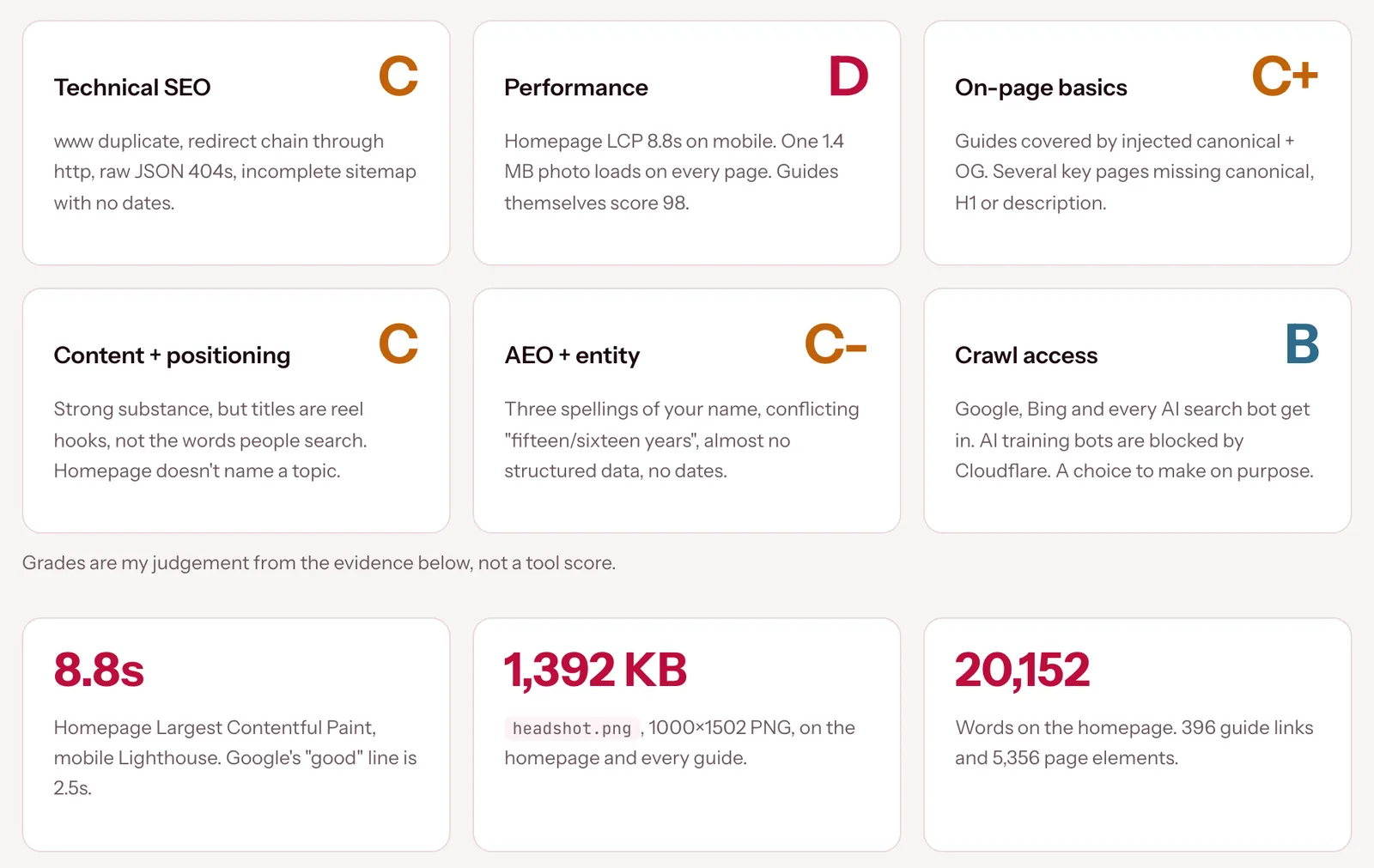
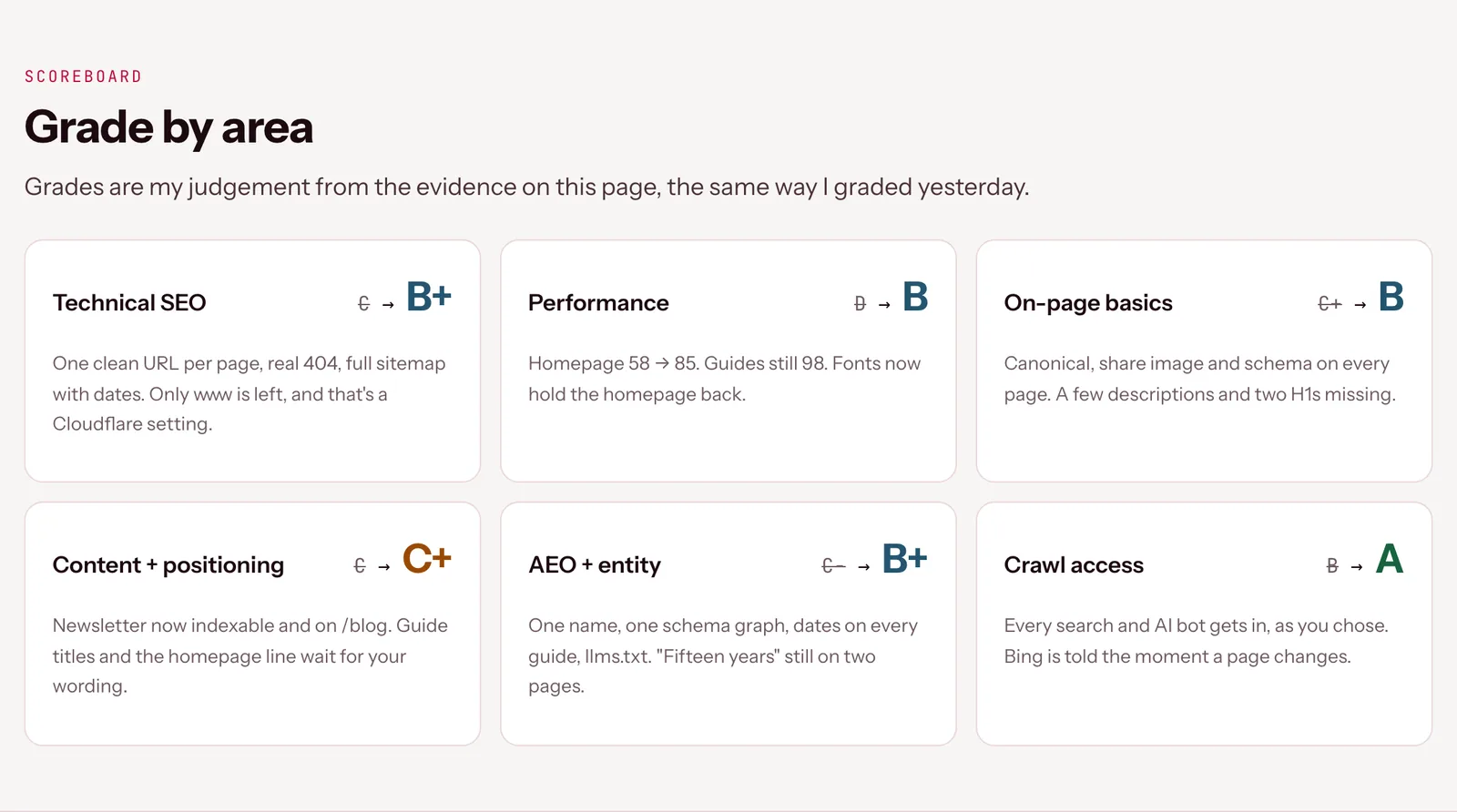
Claude's grades for my site in the first audit and in the re-audit after the fixes. The grades are Claude's judgement from the evidence, not a tool score.
2. Make it a monthly routine. Every new page you publish can bring an old problem back, so run Prompt 4 on the first working day of each month and after any big batch of new pages. Here's the checklist I'd keep next to it.
You've got four prompts and a monthly checklist. Open Claude Code on your site's folder today, paste Prompt 1 and read the report before you change a single thing.
What this won't do: Lighthouse runs a test on one machine with one phone setting, so real visitors on slower connections can have a different experience. Google says there are no special requirements for its AI Overviews beyond being indexed and eligible for a snippet. llms.txt is also still a proposal, so neither one will lift you into AI answers on its own. My numbers here are speed and audit results, not traffic, because search results take time to move and I don't have those figures yet. Claude can get things wrong, so check every change before it goes live.
Get the plan first. Then let the fixes happen.
Related guides: How to spin up Claude subagents, Meet Claude Code and I built my website in an evening with Claude Code.
My numbers come from my own audit of fadeadeniyi.com on 29 October 2026 and the re-measure the same night (mobile Lighthouse). Sources, opened 30 October 2026: web.dev, Largest Contentful Paint; Chrome for Developers, Lighthouse performance scoring; Google Search Central, AI features and your website and snippets; The Open Graph protocol; llmstxt.org and AnswerDotAI/llms-txt on GitHub; Claude Code docs, subagents.
The Audacity to Build is my community for people doing exactly that. It is opening soon. Join the waitlist and you are first in when it does.
If this was useful, follow me. I share what I am actually building, the tools that survive my own testing, and the ones I quietly cancel. New plays every week.
Pop in your name and email and the guide is yours, along with the occasional new guide when I publish one. No spam, ever.