
Fadé Adeniyi
Wednesday 4 November 2026
The six slash commands behind my studio effects, every command file in full, plus the one-time setup.
For effects like these, yes. Each one is a custom slash command: a short Markdown file in your project's .claude/commands folder that tells Claude Code what to build. Claude Code writes the effect in Remotion, a React video framework that's free for individuals. A free tool called rembg cuts you out of every frame. You still film the take yourself.
Type /new-room 4 8 and Claude Code reads new-room.md, drops whatever you typed after the command where the file says $ARGUMENTS and does the job (Claude Code docs). All six commands share one trick: a cut-out of you for every frame, so things can sit behind you as well as in front.
npx create-video@latest

npx -y skills@latest add remotion-dev/skills

pip install "rembg[cpu,cli]"

brew install ffmpeg

mkdir -p .claude/commands
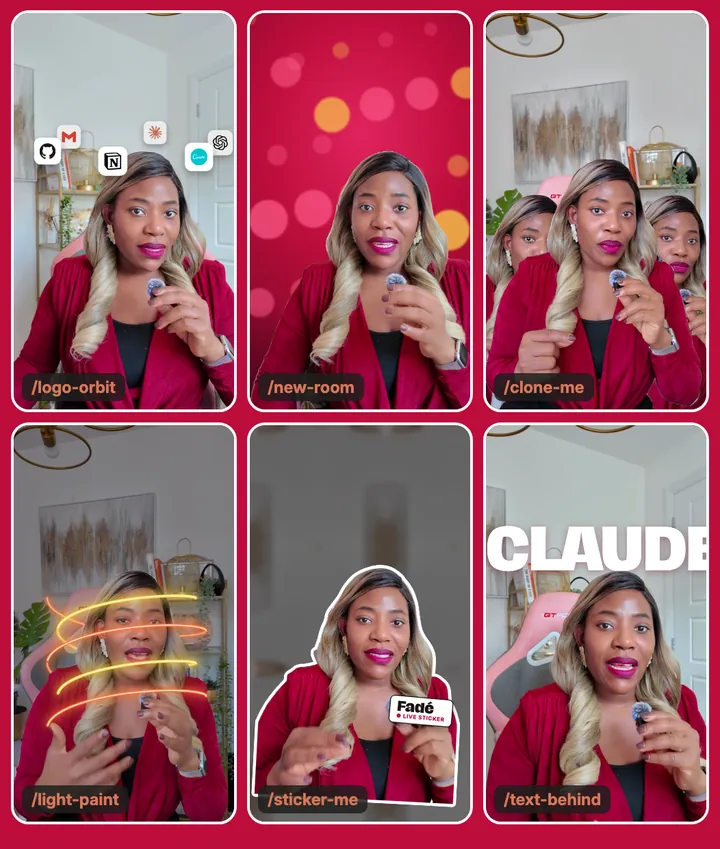
The trap is asking Claude to remove your background with one cut-out. One still frame can't follow you when you move, so the effect slips off. Cut out every frame of the clip and draw the frame that matches.
The 6 commands
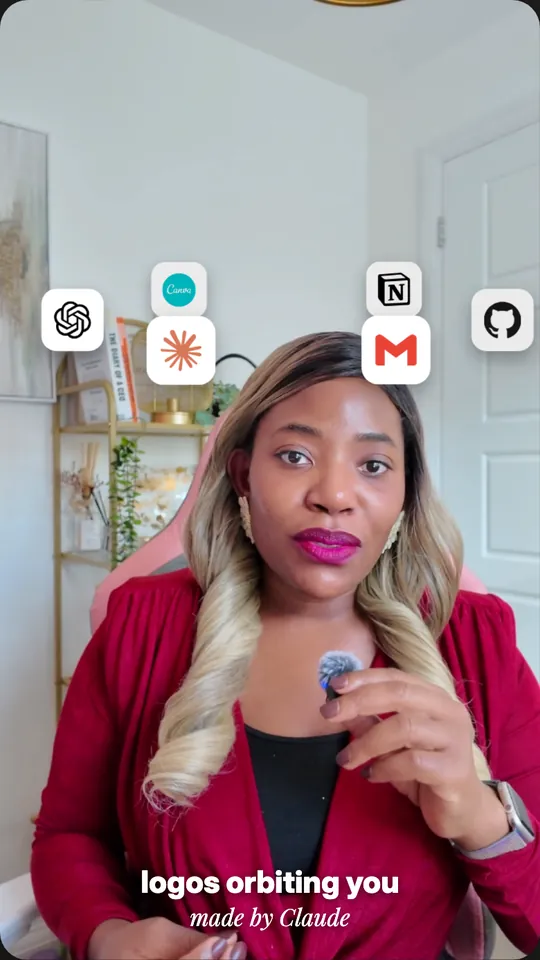
1. /logo-orbit circles real app logos round your head and the far ones pass behind you. Example: /logo-orbit Claude, ChatGPT, Notion, Gmail 2 6.
---
description: Orbit app logos around my head, passing behind me
argument-hint: [up to 6 tools] [start second] [end second]
---

Make app logos orbit my head in my talking-head video in this Remotion project. The tools and timing are: $ARGUMENTS

CUT-OUTS: extract every frame of that part with ffmpeg and cut me out of each one with rembg (u2net_human_seg model) as numbered transparent PNGs in public/matte/. No rembg? Give me the install command and stop.

TILES: each tool's real logo on a white rounded 140px tile with a soft shadow, from simple-icons or the tool's official SVG. Never draw a logo yourself.

ORBIT: space the tiles evenly on a flat ellipse around my head, about 430px out to each side and 70px deep, sitting above my forehead so nothing covers my face. They circle about once every four seconds. Tiles on the far side shrink to about 78% and darken slightly.

LAYERS, from the bottom up:
1. My video.
2. The tiles on the far half of the ellipse.
3. The cut-out PNG for the current frame, drawn exactly over the video.
4. The tiles on the near half.

ANIMATION: the ellipse springs open from my head in about half a second.

Render a still for me to check before you render the video.
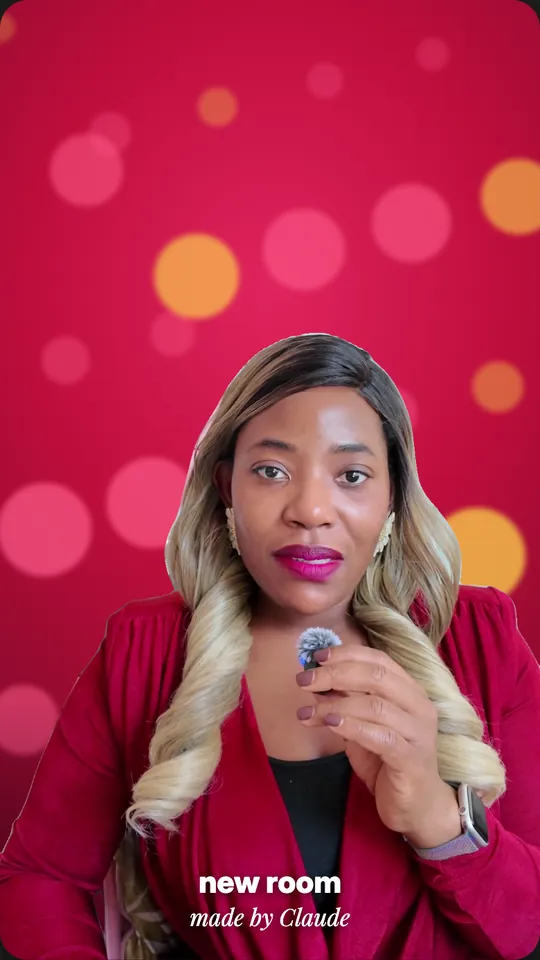
2. /new-room swaps the room behind you for a crimson studio with drifting lights, wiping up from the bottom. Example: /new-room 30 34.
---
description: Swap the room behind me for a crimson studio with drifting lights
argument-hint: [start second] [end second] [colour, optional]
---

Replace the room behind me in my talking-head video in this Remotion project. The timing and colour are: $ARGUMENTS

CUT-OUTS: extract every frame of that part with ffmpeg and cut me out of each one with rembg (u2net_human_seg model) as numbered transparent PNGs in public/matte/. No rembg? Give me the install command and stop.

THE ROOM: a radial gradient lit from above centre, bright pink-crimson in the middle (#E0245E), my crimson (#BD0D3B) around it and deep wine at the edges (#5A0620). If I give you a colour, build the same three steps from that. Over it, about 22 soft circles of pink and yellow light, blurred about 6px, in different sizes and strengths, each drifting slowly upwards at its own speed. Shade the bottom darker.

LAYERS: the new room, then the cut-out PNG for the current frame on top.

ANIMATION: the room wipes up from the bottom of the frame in about 0.4 seconds.

Render a still for me to check before you render the video.
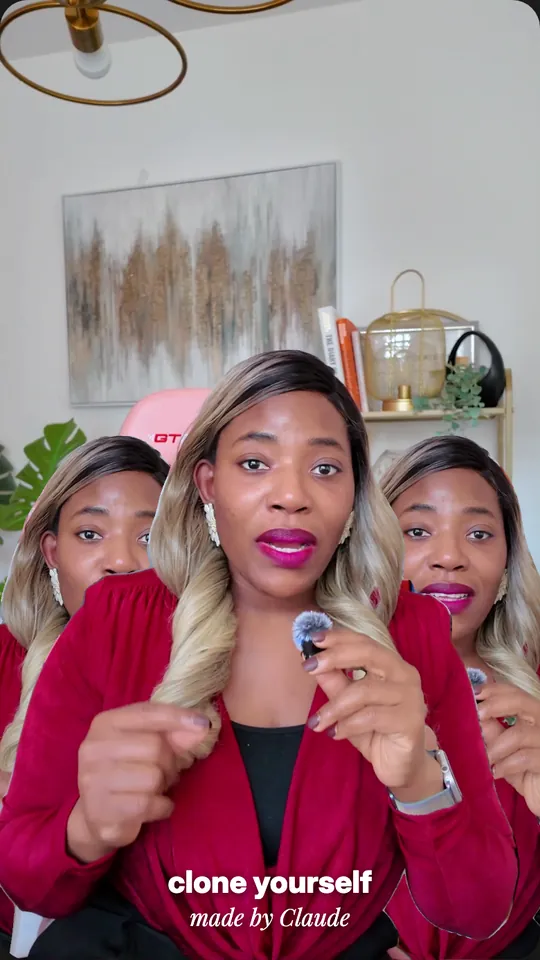
3. /clone-me makes two copies of you step out to either side. They run a few frames behind you, so they're out of sync. Example: /clone-me 44 47.
---
description: Two copies of me step out to the left and right
argument-hint: [start second] [end second]
---

Clone me in my talking-head video in this Remotion project. The timing is: $ARGUMENTS

CUT-OUTS: extract every frame of that part with ffmpeg and cut me out of each one with rembg (u2net_human_seg model) as numbered transparent PNGs in public/matte/. No rembg? Give me the install command and stop.

CLONES: two extra copies of the cut-out, scaled to 86% from the bottom centre and a little darker (about 93% brightness). One slides about 330px to the left and the other about 330px to the right, each with a spring.

OUT OF SYNC: the left clone plays the cut-outs 6 frames behind me and the right clone 12 frames behind, so they don't move exactly like me. The right one steps out about 0.2 seconds after the left.

LAYERS, from the bottom up: my video, the two clones, then the cut-out of the real me for the current frame on top.

Render a still for me to check before you render the video.
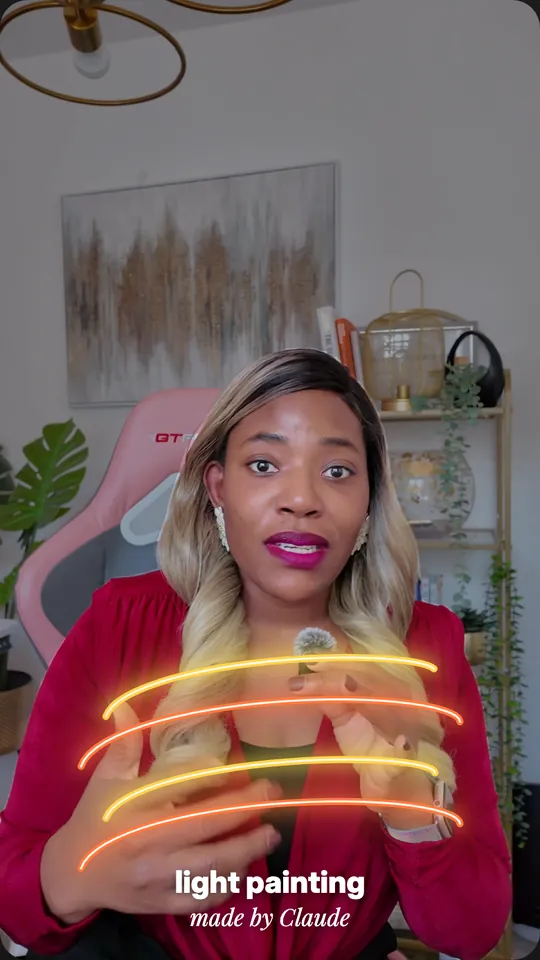
4. /light-paint swirls gold and orange light ribbons round your body. The back of each loop goes under your cut-out and the front goes over it. Example: /light-paint 48 52.
---
description: Swirl glowing light ribbons around my body
argument-hint: [start second] [end second]
---

Add light painting around me in my talking-head video in this Remotion project. The timing is: $ARGUMENTS

CUT-OUTS: extract every frame of that part with ffmpeg and cut me out of each one with rembg (u2net_human_seg model) as numbered transparent PNGs in public/matte/. No rembg? Give me the install command and stop.

THE LIGHT: two spiral ribbons drawn as SVG paths, one gold (#FFD84D) and one orange (#FF7A3D), half a turn apart. Each makes two loops around my body, rising from my waist to my chest and staying below my chin. Draw each as a 14px coloured stroke with two soft glows (drop shadows of about 18px and 40px) and a thin white core line on top.

LAYERS, from the bottom up: my video with the room dimmed by about a third, the part of each spiral that goes round the back of me (a little fainter), the cut-out PNG for the current frame, then the part in front.

ANIMATION: the ribbons draw on from the bottom up over about two seconds. They follow a fixed path, so they don't track my hands.

Render a still for me to check before you render the video.
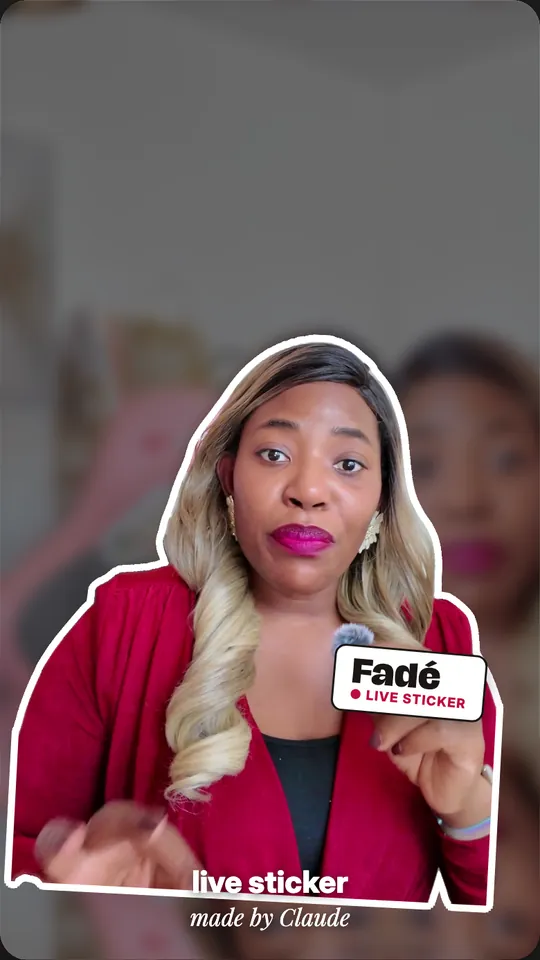
5. /sticker-me turns you into a white-outlined sticker while you keep talking. The outline is 16 white copies of your cut-out in a ring. Example: /sticker-me Fadé LIVE STICKER 60 64.
---
description: Turn me into a live sticker with a white outline and a name tag
argument-hint: [name] [line under the name] [start second] [end second]
---

Turn me into a live sticker in my talking-head video in this Remotion project. The details are: $ARGUMENTS

CUT-OUTS: extract every frame of that part with ffmpeg and cut me out of each one with rembg (u2net_human_seg model) as numbered transparent PNGs in public/matte/. No rembg? Give me the install command and stop.

BACKGROUND: darken the room behind me by about half and blur it about 16px.

THE STICKER: I keep moving, so use the cut-out for the current frame every frame. Make the white outline by placing 16 copies of it, turned solid white, in a ring about 16px out from the original, then draw the real cut-out on top. Shrink the whole sticker by about 12%, tilt it 3 degrees and lift it slightly, with a spring.

NAME TAG: a white rounded label with a thick dark border at chest height on the right, tilted about 5 degrees, popping in a quarter of a second after the sticker. My name large and bold, with the small line under it in my accent colour.

Render a still for me to check before you render the video.
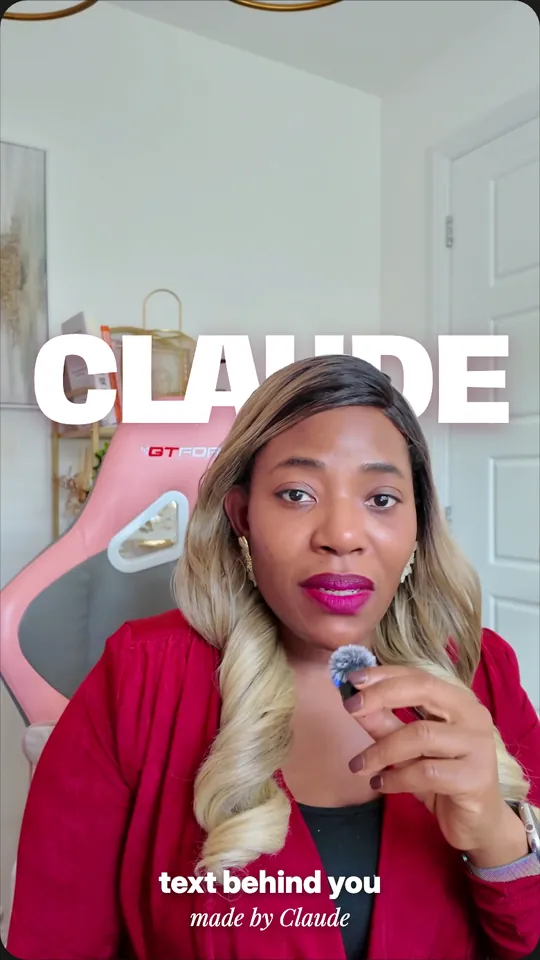
6. /text-behind puts one giant word behind your head. The cut-out on top is what puts your hair in front of the letters. Example: /text-behind CLAUDE 76 80.
---
description: Put one giant word behind my head
argument-hint: [word] [start second] [end second]
---

Put a giant word behind me in my talking-head video in this Remotion project. The word and timing are: $ARGUMENTS

CUT-OUTS: extract every frame of that part with ffmpeg and cut me out of each one with rembg (u2net_human_seg model) as numbered transparent PNGs in public/matte/. No rembg? Give me the install command and stop.

LAYERS, from the bottom up:
1. My video.
2. The word in capitals, about 230px, extra bold and white, centred at the top of my head, with a soft crimson shadow.
3. The cut-out PNG for the current frame, drawn exactly over the video, so my hair covers the bottom of the letters.

ANIMATION: the word rises about 140px and scales down from 115% into place in about half a second.

Check each cut-out lines up with its frame, then render a still for me to check.
Start with /new-room or /text-behind. They're the simplest of the six and they show you straight away whether your cut-outs are clean. Every command renders a still first, so check it before you spend time on a full render.
How I use it. Every effect in my STUDIO reel is one of these six commands run on the same talking-head take. The cut-outs run on my own Mac with rembg, so I don't pay for a background remover. I type the command, check the still Claude renders and only then render the clip.
Command or skill? Anthropic's docs say custom commands are now part of skills. A file in .claude/commands still works and still gives you the slash command. A skill in .claude/skills does the same and can carry supporting files (Extend Claude with skills).
What this won't do: Claude writes different code each time, so expect to nudge a position or a timing. Cut-outs take a while on a long clip and rembg can miss stray hair. Claude Code needs a paid Claude plan and Remotion is free for individuals and small companies, while bigger companies need a licence (Remotion licence).
Your take stays the same. The room, the light and the crowd don't.
Sources, opened 4 November 2026: Claude Code Docs, Extend Claude with skills and Desktop quickstart; Remotion docs and licence; rembg (MIT licence).
The Audacity to Build is my community for people doing exactly that. It is opening soon. Join the waitlist and you are first in when it does.
If this was useful, follow me. I share what I am actually building, the tools that survive my own testing, and the ones I quietly cancel. New plays every week.
Pop in your name and email and the guide is yours, along with the occasional new guide when I publish one. No spam, ever.